← Back to the main page
Android app by OMLField Capture
Your business system in your pocket, even offline.
Field Capture works with OML's Invoicer and SmartOrder. Photograph receipts into your accounts, sell at a till that keeps working when the signal drops, count and move stock with the camera, and see your day at a glance.
For Android phones and tablets (Android 7.0 and newer). Made in Mauritius by OML LTD.
What you can do with Field Capture
Purchases, sales and stock, wherever you are.
From the receiptExpenses and purchases
- Photograph the receipt, enter the amount, done: it is booked in your accounts.
- Choose the category and supplier, or save a draft and finish later.
- No signal? It waits on the phone and sends itself when you are back online.
The tillSell anywhere
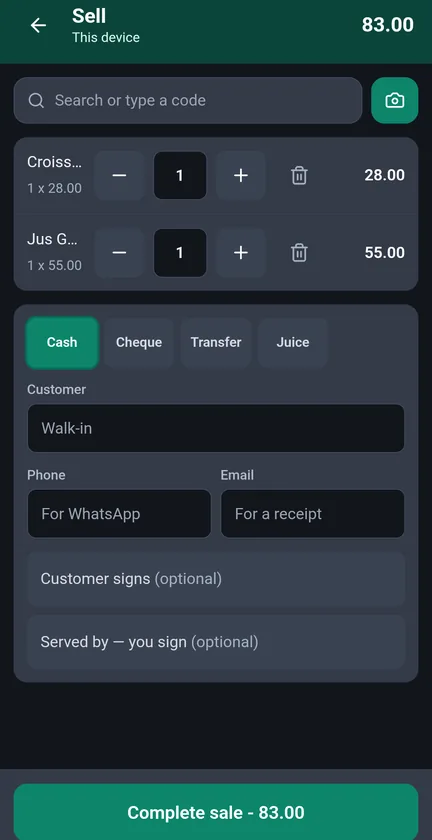
- A till for phone and tablet: tap products or scan their barcodes.
- Keeps selling offline and sends the sales when the connection returns. QR payments need a connection, because the bank must confirm the money.
- Customer name, phone and signature when you need them, and receipts by WhatsApp.
StockCount and move stock
- Count stock with the camera: every scan counts one.
- Stock in and out, and moves between shops and stores.
- A barcode you do not have yet? Create the item on the spot.
Your dayYour day at a glance
- Today's sales and low stock.
- Who is at work, and leave to approve.
No server?Use "This device"
- Run a small shop with everything kept on the phone: sales, purchases and stock.
- Records are kept encrypted on the phone, and you can lock them with your fingerprint.
- Try it for 30 days.
Private by designYour records, your system
- Everything goes only to your business's own Invoicer or SmartOrder account, over a secure connection.
- No ads, no tracking, no location, no contacts.
Getting started
From install to your first receipt.
Install Field Capture
From Google Play ↗ on your Android phone or tablet.
Sign in to your system
Your business's Invoicer or SmartOrder address and your usual sign-in. No account? Choose "This device".
Photograph a receipt
Take the photo and type the amount: the expense is in your accounts.
Sell and count
Open the till or the stock count. Both keep working without signal.
Questions
Field Capture with Invoicer and SmartOrder.
The system behind it
- Invoicer: invoices, purchases, accounts, staff attendance and payroll.
- SmartOrder: orders, bookings, online selling and delivery.
- Both start with a 30-day trial.
See all our services →
Questions, answered
Do I need an Invoicer or SmartOrder account?
For your business's records, yes: Field Capture signs in to your own system. Without one, choose "This device" and the app works on its own, with a 30-day trial.
What if there is no signal?
Receipts and sales wait on the phone and send themselves when the connection is back. QR payments need a connection, because the bank must confirm the money.
Where are my records kept?
In your business's own Invoicer or SmartOrder account. In "This device" mode they stay on the phone, encrypted.
How is it different from O-Biz?
O-Biz is a complete shop on one phone, with MauCAS QR payments through blink. Field Capture is the mobile side of your Invoicer or SmartOrder. See O-Biz
Does it work on iPhone?
Field Capture is for Android phones and tablets.
Field Capture help line
+230 5850 1920 · calls during office hours, WhatsApp 24/7.
 omlcloudBUSINESS, CONNECTED.Cart